ReliaHome Flex Hub Module Lights
| Description | Indication | |
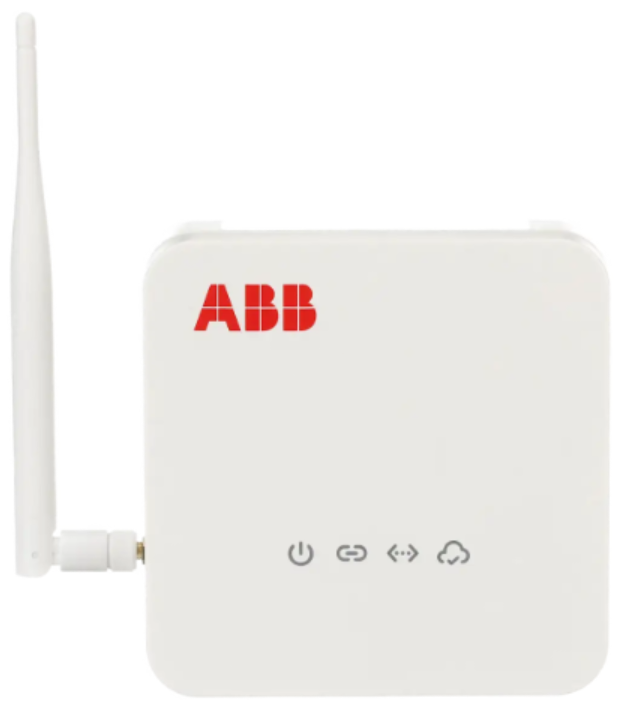 | Power | Hub Module has power when indicator is blue. |
Paired | Hub Module is paired with at least one other device, such as a ReliaHome Flex Controller, when indicator is blue. | |
Ethernet | Hub Module has a working ethernet connection when indicator is blue. Ethernet (not WiFi) is required between the Hub Module and a switch, modem, or router. | |
Cloud | Hub Module is communicating with the cloud when indicator is blue. |
ReliaHome Flex Controller Module Lights
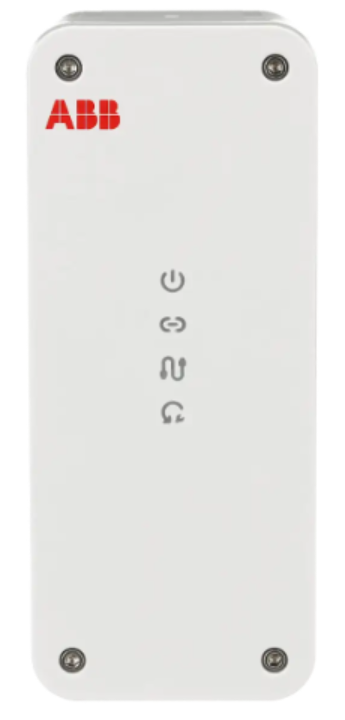 | Description | Indication |
| Power | Controller Module has power when indicator is blue. | |
| Paired | Controller Module has been paired to a ReliaHome Flex Hub when indicator is blue. | |
Circuit | Controller Module relay closed (circuit "on"): Circuit indicator is blue. Controller Module relay open (circuit "off"): Circuit indicator is off/unlight. | |
Override | Override on: Indicator is red. Override off: Indicator is off/unlit. |
Note: The Override function is normally off and can only be activated by the Certified Installer if instructed to do so by ReliaHome Customer Support. Call 888-421-0616 or write to support@reliahome.abb.com if you believe a device may need to be put into Override mode or other be factory reset.
Was this article helpful?
That’s Great!
Thank you for your feedback
Sorry! We couldn't be helpful
Thank you for your feedback
Feedback sent
We appreciate your effort and will try to fix the article